Showing posts with label HA. Show all posts

Tuesday, November 11, 2014

Part 3: High Availability options with vRealize Operations Manager!

With this part of the series, I will start right from where I left in my last article. In the previous post, I spoke about the architecture of vROps along with the various services and node types which are available with this release. At the end of that article, I spoke about the benefit of having a cluster like architecture which not only provides scalability to the entire solution, but also allows you to protect the solution by building in resiliency.

The cluster architecture of vROps is not about scaling the various services within the solution, however it is about making these services modular by using a uniform measure to scale them. This uniform measure is a DATA NODE. Hence, instead of scaling out let's say just the PERSISTENCE layer by adding more memory, you would basically look at adding a new DATA NODE which will automatically add scale to all the services in an equal amount. This not only makes the solution modular, it also ensures that standardisation is maintained during scale resulting in a predictable and optimised performance.

For ease lets take a scenario where we have One Master Node, One Master Replica and one Data Node as shown in the figure below:-


Taking the above architecture let us discuss a few scenarios which are handled by the vROps cluster for data distribution, redundancy and resiliency.


HOW DATA ARRIVES INTO vROps CLUSTER

The resource will be assigned to one Node and all the analytics work regarding that resource will be done by that node itself. Only in case of failure the standby node which has the replicated data will become the Active Node for that resource.


HOW DATA IS RETRIEVED FROM vROps CLUSTER


With this architecture the data retrieval for 'HOT DATA' is extremely fast since the data is in the 
"in-memory database" layer of the cluster. Now that we know how the data is collected and retrieved, we can look at various failure scenarios which a vROps cluster can survive.

MASTER NODE FAILURE - If the master node fails, the complete responsibility of the master is taken over by the Master Replica. The Replica gets promoted and ensures that the solution is available at all the time. In case the Master Node failed due to a hardware failure and is back online with the help of vSphere HA, this node will be configured as the Replica Node thereafter.

DATA NODE FAILURE - If the Data Node fails, then the owning resources of that node are promoted on the surviving nodes which have a replica copy of these resources. The new owning node is responsible for collection of data from here onwards. If a data node has failed due to hardware failure and vSphere HA brings it back on a surviving ESXi node in the vSphere cluster, then this node automatically joins the vROps cluster and the data points are synced on this node. If a data node has been out of a cluster for a long time (more than 24 hours), it would be a better idea to re-create that node from the scratch rather than rebuilding/re-syncing the data.

IMPACT ON DATA FLOWS DURING FAILURE - If a node fails while the data is being queried or collected in the vROps cluster, it would not have any impact on data failure or availability as the surviving nodes will serve that data requirement through the replicated resources on them.

The placement of each node of the cluster should be done on a separate ESXi host using anti-affinity DRS rules to ensure that a host failure should not impact more than one Node in the cluster to avoid any data loss / availability issues.

Now that we know how vROps cluster architecture works, in the next part of this series we will have a look at the various deployment models which can come into picture when you plan to deploy vROps 6.0 in your infrastructure.


Till then.... Stay Tuned :-)


Share & Spread the Knowledge!!


Sunday, November 9, 2014

Part 2 : vRealize Operations Manager Architecture Deep-dive!

In my previous post I gave you an overview of vRealize Operations Manager 6.0. In that post, I have spoken briefly about the architectural changes or differences between vCOps 5.x and vROps 6.0. With this post, I will take it a few levels deeper to explain the entire architecture of vROps 6.0

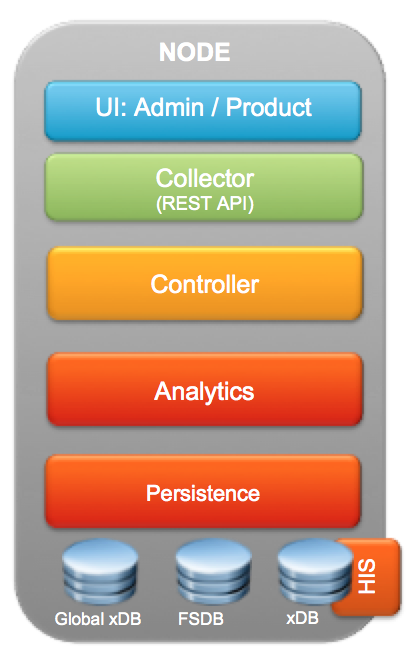
One of the biggest change in vROps 6.0 is the scale out architecture of the application, which not only allows you to monitor more resources, but also bring a RAIN like architecture due to the resiliency available in the application layer. I will talk about the technology behind this in a moment, but before that let's have a look at a graphic which can give us an overview of the ARCHITECTURE of the vROps appliance.


For those who have worked on vCOps 5.x, you will immediately notice that the above logic al architecture of vROps just shows a single VM / Appliance. This is not a mistake. This single node is the complete vROps solution as it has the formerly known Analytics and UI VM converged into a single VM. This not only makes things simpler to deploy, but make it a lot easier to manager as well. With this let me give you an overview of each layer starting from the topmost stack.


UI:ADMIN/PRODUCT - With vROps 6.0, the Admin UI, vSphere UI & the Custom UI are converged into a single UI. When you first launch the web ui using the IP address, you are placed in a first time setup wizard which is the Admin UI interface. On subsequent connections, you will be interfaced with the Product UI  which is a single user interface to look at the vSphere Objects and Customization options. The Admin UI hence would be used for the first time setup and then cluster management activities such as adding data nodes, removing data nodes, bringing the cluster online etc. The Product UI on the other hand is for Application access, where you can setup policies, Alerts, Custom Dashboards, Management Packs and a plethora of other tasks which comes from the previous version of the product and of-course all the new stuff which I discussed in my previous post.


COLLECTOR - The responsibility of the collector does not change much from the previous versions of the product. Collector as always is responsible for capturing the data coming through the adapters. The enhancement made here is the introduction of extensible published APIs which can now be used to inject data from 3rd party sources or do ETL operations through other tools in the datacenter. The APIs are published and can be utilised by customers to extend the goodness of vROps across their infrastructure & application platforms.


CONTROLLER - The controller here is the brain of the collection & retrieval engine. It is responsible to map the collected data to the right resources and also retrieve data for the requested queries. It also plays a vital role in keeping the remote collectors informed about the changes happening in the system and the work they need to do to ensure consistency of data for all the resources being monitored by the system.


ANALYTICS - The role of the Analytics stack does not change much. This engine ensures that all the patented algorithms within vROps are applied to the collected data and functions such as super-metrics, dynamic threshold calculation, Alerts etc are calculated and then available for viewing, providing recommendations and taking actions.


PERSISTENCE - While all this is happening on the top layer, the mastermind lies in the Persistence layer which gives vROps the performance required for monitoring thousands of objects for which data is collected, stored, analyzed and retrieved at the speed of light. This persistence layer works as a data service layer for all of the above layers & the agility in this data service layer comes from using in-memory database powered by Pivotal Gemfire. Gemfire not only helps with persistence of data, but it also makes vROps CloudScale by easily scaling out the vROps application across multiple nodes. This gives the scalability, performance & availability to the solution which was missing in the previous versions of vROps.


DATABASES - Along with the architectural change vROps 6.0, also has a change in the way the databases work. Let me give you a quick brief as to how these databases function as they are the backbone of the deployment:


  • FSDB - The File System Database is available in all the NODES of a vROps 6.0 Cluster deployment. This is where all the collected metrics are stored in the raw format.

  • xDB (HIS) - The xDB is where the Historical Inventory Service data is stored. This is available only on the MASTER Node or the first node of the vROps Cluster. This would also be a part of the REPLICA node which is a true copy of the MASTER node for failover purposes.

  • GLOBAL xDB - This is where the the user preferences, alerts & alarms stored. This would where all the customization related to vROps would be stored. Like xDB this is available only on the MASTER Node or the first node of the vROps Cluster. This would also be a part of the REPLICA node which is a true copy of the MASTER node for failover purposes.


We will have more clarity once we look at the cluster architecture of vROps 6.0. Let's now dive in the cluster architecture to understand this in more detail. We will have a look at this graphic to see how a vROps 6.0 cluster can scale out by adding new DATA NODES, and how one of the DATA Nodes can work as a MASTER-REPLICA to ensure that we always have a resilient master in case of the MASTER going down due to hardware or application failure. Remember we have a RAIN architecture and hence the MASTER will always be up and the collection will continue even in case of hardware or application level failures. Here is the Cluster Architecture represented through a graphic:-


With vROps 6.0, you have the concept of different kinds of nodes which can make up the vROps cluster. Let me give you a brief description about each node type in a cluster:-

MASTER NODE - As the name suggests is the MASTER of the cluster. This is essentially the first node of the cluster i.e. if you plan to build one. I will talk about various deployment models as we move forward in this series. This node has the Global xDB (Postgres), the xDB as well as the FSDB. In essence, this node is where all the customization of your entire vROps solution lies. Things such as user preferences, policies and the entire brain of the solution.

REPLICA NODE - Doing justice to it's name, the Replica Node also called 'Master Replica' is the exact copy of the master node. This is to give resiliency to the solution. In vROps GUI this is identified as enabling High Availability. This node is not doing any work, but just watching the master node at all times and syncing with the node to ensure that it can take its place once the Master Fails.

DATA NODE - Every node which collects data in the vROps cluster is a Data Node. The function of this node is to ensure that it collects the data from you environment based on the adapters which are assigned to this node. This node basically allows you to keep scaling your cluster by adding new nodes.

REMOTE COLLECTOR - The remote collector is not a new concept in vROps, but this is now the only solution to get data from an environment which is not within a LAN. In other words, you have to install a REMOTE COLLECTOR if you need to fetch the data from a remote location into a centralized vROps cluster/node. Good news is that it is the same appliance which you have to install, and just chose collector during the install which makes it a simple install. Collector does not have the CONTROLLER, ANALYTICS or the PERSISTENCE layer since it is not required. It sends the data out to the centralized controller and then the data is treated using the Analytics engine.


With this I will close this article. In my next article, I will give you an overview of how this Cluster Architecture Provides resiliency to vROps solution and ensures that even in case of Node failures or Data Loss, how can vROps can continue to function normally and fetch and load the collected data into the system.


STAY TUNED....


SHARE & SPREAD THE KNOWLEDGE :-)


Saturday, September 29, 2012

Providing Protection & High Availability to a VMware vCenter Server..

vCenter being the heart of a virtual infrastructure can be considered as one of the most important piece of the puzzle. I have had numerous discussions with customers, colleagues and VMware partners about the importance of vCenter Availability and the options to protect the vCenter to improve the up-time and mitigate any risks around losing the control of your Virtual Infrastructure.

This article is to ensure that we document all the available scenarios and options and help others to take decisions around improving the availability of VMware vCenter. I am sure there would still be some scenarios out there which I might have missed, and would be happy to discuss them through the "Comments" section of this post.... So feel free to share your thoughts!!!

Alright let's begin.....

First of all lets start with a few basic questions to clear the fog around the role of VMware vCenter Server (I am doing this for the new kids on the block..)

What is vCenter Server?

Virtual Center provides a centralized and extensible platform for managing virtual infrastructure. VMware vCenter Server, formerly VMware VirtualCenter, manages VMware vSphere environments allowing IT administrators simple and automated control over the virtual environment to deliver infrastructure with confidence. More Details can be found here.


vCenter Should be Virtual or Physical?

Yes your vCenter is an application which can be installed on Virtual Machine as well.. Read my post on this topic - VMware vCenter Server - Physical vs. Virtual. This should tell you what is the best option for your environment.


vCenter Server (Windows Based) or vCenter Server Appliance a.k.a VCSA (Linux Based)?

For Linux lovers vCenter is not restricted to Windows anymore, you can also get a Linux based appliance from VMware. I have written a post about "Choosing the Platform for your Virtual Center. vCenter Server Appliance(vCSA-Linux) vs vCenter (Windows)"!! I would recommend you read this to understand which is a better option for your environment.


Whether its Physical or Virtual, Linux Based Appliance or Windows Based, it is important that we protect the virtual center so that we do not lose control of the ESXi servers and the virtual machines which run the business applications. Let us quickly look at the options to protect both vCenter Server (Windows Based) & vCenter Server Appliance a.k.a VCSA (Linux Based)...


Great, so now we have the methods available in the table... Lets dissect them one at a time to see what each option has to offer.

Option 1 - Use VMware vSphere HA  - If your vCenter is a Virtual Machine you can place the vCenter Virtual Machine in the VMware HA cluster. HA will protect the vCenter Virtual machine just like any other virtual machine. If the ESXi server which is running the vCenter VM goes down, HA will kick-in and power on this VM from the shared storage, on another HA cluster member host. The only downtime in this case would be the time taken to reboot the vCenter VM. Pretty cool, right!! I appreciate this from VMware...


Option 2 - Cold/Standby vCenter - This is a poor man's HA and I have seen customer's use this configuration, especially the one who have the vCenter as a physical server and cannot use vSphere HA. The  architecture of this deployment, needs you to have a remote database for vCenter application. You have 2 servers with same version of vCenter application installed. In case the first one goes down, you power on the other server which connects to the same database and hence pulls up all the configuration. This method surely works but needs human intervention. Hence if you vCenter goes down in the middle of the night when your backups are happening using VADP, your backups would fail and you would not be able to fix this unless you come back in the morning and see the damage......


Option 3 - Using vCenter Heartbeat - vCenter Heartbeat is a high availability solution for vCenter Server which protects the vCenter against OS, Application, Database(SQL), Configuration, Networking or Hardware failures. Yup it also protects the SQL database and can be installed across sites as well (remote location). The beauty is that if you have a Heartbeat license, you would only need one vCenter license for both Primary and Failover site. You should be able to get more information about Heartbeat on the following link.

The reason I have highlighted this option in the above table is due to a reason. Heartbeat comes with a cost and I would highly recommend this option for environments where vCenter up-time is critical. Environments with VMware View, VMware vCloud Director or wherever vCenter APIs are used, the availability of vCenter Server defines the availability of these services. Hence if these services are important vCenter should be given protection using vCenter Heartbeat.


Option 4 - Third party Solutions to Protect vCenter Server - There are a number of options available to name some, configure MSCS for vCenter windows based server, Neverfail etc. can help you protect vCenter Server.


Since, vCenter needs a minimum of 2 vCPU's we cannot use VMware FT to protect this virtual machine. However, I am sure VMware would look at supporting VMware FT with SMP (symmetric multi-processing), which would give another option to customers to protect vCenter Server and ensure they have full control and manageability for their VMware Virtual Environments.

Feel free to share your thoughts around this topic and I hope this helps you design your vCenter with the best suited options for your VMware environments.