Showing posts with label vRealize Operations Suite. Show all posts

Tuesday, December 9, 2014

vRealize Operations Manager 6.0 Released. Go get it!

I am glad to share that vRealize Operations Manager 6.0 is out today. I have been writing a series about this release of the operations management suite in a series here. The release will now allow me to take you deep into the great new features and the recommended best practices to design, deploy and use the solution for effective performance management and capacity planning for EVERYTHING in your datacenter.


Here is what the release notes say about the product:-

vRealize Operations Manager 6.0 is the latest release of VMware's integrated operations suite, converging performance, capacity, and configuration management. This release introduces the following enhancements.
  • Scale-Out Deployment Architecture
    This release provides distributed deployment with elastic scale and higher scalability.
  • Unified User Interface
    This release introduces a single user interface to manage vSphere as well as non vSphere domains. You can create powerful, flexible custom dashboards enabling you to bring any information you want into the management console.
  • Licensing Management in 6.0 
    vRealize Operations Manager 6.0 has an independent license-management GUI that provides enhanced administration of license keys specific to vRealize Operations. Customers can now deploy mixed editions in a single vRealize Operations 6.0 instance.
  • Smart Alerts
    Smart alerts combine multiple symptoms to generate a single alert that focuses on the underlying issue with clear recommendations and option to take action for remediation.
  • Enhanced Reporting
    Enhanced reporting provides several out-of-the-box reports with the ability to generate fully customizable reports.
  • Capacity Planning and Project Management Capabilities
    New capacity planning and project management capabilities extend beyond vSphere and across physical and application level metrics. Flexible capacity models can be adjusted to meet different business needs.
  • Custom Policies
    Custom policies can applied for specific workload types, applications or clusters enabling more advanced monitoring of performance, capacity and configuration standards.
  • Automated Remediation of Problems
    Integrated action and remediation capabilities with the ability to apply actions according to the recommendation for the alerts.
  • User Access Control Management
    Improved user access control, including granular role-based access control.
  • Unified Storage Visibility
    New storage visibility shows the correlation between the application group and the storage infrastructure supporting it, including HBA's, Fabric and Arrays, along with the ability to trace operational issues all the way to storage.

Here are the links to the Product Documentation and Download.


vRealize Operations Manager 6.0

vRealize Operations Manager 6.0 | 9 DEC 2014 

Product Download
 Visit the vRealize Operations Manager 6.0 Documentation Center to learn more about the product
New Features and Release Notes
vRealize Operations Manager 6.0 Release Notes
Compatibility and Configuration Limits
Hardware, Host Operating System, and Guest Operating System Compatibility Guides
VMware Product Interoperability Matrix
vRealize Operations Manager Product Documentation
vRealize Operations Manager Virtual Application Installationhtmlpdfepubmobi
vRealize Operations Manager Linux and Windows Installationhtmlpdfepubmobi
Connecting vRealize Operations Manager to Data Sourceshtmlpdfepubmobi
Configuring Users and Groupshtmlpdfepubmobi
Monitoring Objects in Your Managed Environmenthtmlpdfepubmobi
Planning the Resources for Your Managed Environmenthtmlpdfepubmobi
Customizing How vRealize Operations Manager Displays Your Datahtmlpdfepubmobi
Customizing How vRealize Operations Manager Monitors Your Environmenthtmlpdfepubmobi
Maintaining and Expanding vRealize Operations Managerhtmlpdfepubmobi
Metric Definitions in vRealize Operations Managerhtmlpdfepubmobi
vRealize Operations for Horizon Documentation
vRealize Operations for Horizon is compatible with VMware vRealize Operations Manager version 6.0.
vRealize Operations Manager for Horizon Installationhtmlpdfepubmobi
vRealize Operations Manager for Horizon Administrationhtmlpdfepubmobi
vRealize Operations Manager for Horizon Securityhtmlpdfepubmobi

So go ahead, download your copy and start relishing the NextGen operations management solution for your Datacenter (Note: Not only VIRTUAL but PHYSICAL as well) :-)


Share & Spread the Knowledge 


Monday, November 24, 2014

Sunday, November 9, 2014

Part 2 : vRealize Operations Manager Architecture Deep-dive!

In my previous post I gave you an overview of vRealize Operations Manager 6.0. In that post, I have spoken briefly about the architectural changes or differences between vCOps 5.x and vROps 6.0. With this post, I will take it a few levels deeper to explain the entire architecture of vROps 6.0

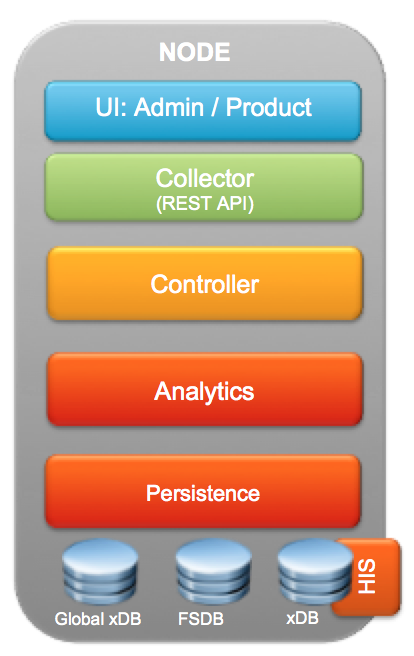
One of the biggest change in vROps 6.0 is the scale out architecture of the application, which not only allows you to monitor more resources, but also bring a RAIN like architecture due to the resiliency available in the application layer. I will talk about the technology behind this in a moment, but before that let's have a look at a graphic which can give us an overview of the ARCHITECTURE of the vROps appliance.


For those who have worked on vCOps 5.x, you will immediately notice that the above logic al architecture of vROps just shows a single VM / Appliance. This is not a mistake. This single node is the complete vROps solution as it has the formerly known Analytics and UI VM converged into a single VM. This not only makes things simpler to deploy, but make it a lot easier to manager as well. With this let me give you an overview of each layer starting from the topmost stack.


UI:ADMIN/PRODUCT - With vROps 6.0, the Admin UI, vSphere UI & the Custom UI are converged into a single UI. When you first launch the web ui using the IP address, you are placed in a first time setup wizard which is the Admin UI interface. On subsequent connections, you will be interfaced with the Product UI  which is a single user interface to look at the vSphere Objects and Customization options. The Admin UI hence would be used for the first time setup and then cluster management activities such as adding data nodes, removing data nodes, bringing the cluster online etc. The Product UI on the other hand is for Application access, where you can setup policies, Alerts, Custom Dashboards, Management Packs and a plethora of other tasks which comes from the previous version of the product and of-course all the new stuff which I discussed in my previous post.


COLLECTOR - The responsibility of the collector does not change much from the previous versions of the product. Collector as always is responsible for capturing the data coming through the adapters. The enhancement made here is the introduction of extensible published APIs which can now be used to inject data from 3rd party sources or do ETL operations through other tools in the datacenter. The APIs are published and can be utilised by customers to extend the goodness of vROps across their infrastructure & application platforms.


CONTROLLER - The controller here is the brain of the collection & retrieval engine. It is responsible to map the collected data to the right resources and also retrieve data for the requested queries. It also plays a vital role in keeping the remote collectors informed about the changes happening in the system and the work they need to do to ensure consistency of data for all the resources being monitored by the system.


ANALYTICS - The role of the Analytics stack does not change much. This engine ensures that all the patented algorithms within vROps are applied to the collected data and functions such as super-metrics, dynamic threshold calculation, Alerts etc are calculated and then available for viewing, providing recommendations and taking actions.


PERSISTENCE - While all this is happening on the top layer, the mastermind lies in the Persistence layer which gives vROps the performance required for monitoring thousands of objects for which data is collected, stored, analyzed and retrieved at the speed of light. This persistence layer works as a data service layer for all of the above layers & the agility in this data service layer comes from using in-memory database powered by Pivotal Gemfire. Gemfire not only helps with persistence of data, but it also makes vROps CloudScale by easily scaling out the vROps application across multiple nodes. This gives the scalability, performance & availability to the solution which was missing in the previous versions of vROps.


DATABASES - Along with the architectural change vROps 6.0, also has a change in the way the databases work. Let me give you a quick brief as to how these databases function as they are the backbone of the deployment:


  • FSDB - The File System Database is available in all the NODES of a vROps 6.0 Cluster deployment. This is where all the collected metrics are stored in the raw format.

  • xDB (HIS) - The xDB is where the Historical Inventory Service data is stored. This is available only on the MASTER Node or the first node of the vROps Cluster. This would also be a part of the REPLICA node which is a true copy of the MASTER node for failover purposes.

  • GLOBAL xDB - This is where the the user preferences, alerts & alarms stored. This would where all the customization related to vROps would be stored. Like xDB this is available only on the MASTER Node or the first node of the vROps Cluster. This would also be a part of the REPLICA node which is a true copy of the MASTER node for failover purposes.


We will have more clarity once we look at the cluster architecture of vROps 6.0. Let's now dive in the cluster architecture to understand this in more detail. We will have a look at this graphic to see how a vROps 6.0 cluster can scale out by adding new DATA NODES, and how one of the DATA Nodes can work as a MASTER-REPLICA to ensure that we always have a resilient master in case of the MASTER going down due to hardware or application failure. Remember we have a RAIN architecture and hence the MASTER will always be up and the collection will continue even in case of hardware or application level failures. Here is the Cluster Architecture represented through a graphic:-


With vROps 6.0, you have the concept of different kinds of nodes which can make up the vROps cluster. Let me give you a brief description about each node type in a cluster:-

MASTER NODE - As the name suggests is the MASTER of the cluster. This is essentially the first node of the cluster i.e. if you plan to build one. I will talk about various deployment models as we move forward in this series. This node has the Global xDB (Postgres), the xDB as well as the FSDB. In essence, this node is where all the customization of your entire vROps solution lies. Things such as user preferences, policies and the entire brain of the solution.

REPLICA NODE - Doing justice to it's name, the Replica Node also called 'Master Replica' is the exact copy of the master node. This is to give resiliency to the solution. In vROps GUI this is identified as enabling High Availability. This node is not doing any work, but just watching the master node at all times and syncing with the node to ensure that it can take its place once the Master Fails.

DATA NODE - Every node which collects data in the vROps cluster is a Data Node. The function of this node is to ensure that it collects the data from you environment based on the adapters which are assigned to this node. This node basically allows you to keep scaling your cluster by adding new nodes.

REMOTE COLLECTOR - The remote collector is not a new concept in vROps, but this is now the only solution to get data from an environment which is not within a LAN. In other words, you have to install a REMOTE COLLECTOR if you need to fetch the data from a remote location into a centralized vROps cluster/node. Good news is that it is the same appliance which you have to install, and just chose collector during the install which makes it a simple install. Collector does not have the CONTROLLER, ANALYTICS or the PERSISTENCE layer since it is not required. It sends the data out to the centralized controller and then the data is treated using the Analytics engine.


With this I will close this article. In my next article, I will give you an overview of how this Cluster Architecture Provides resiliency to vROps solution and ensures that even in case of Node failures or Data Loss, how can vROps can continue to function normally and fetch and load the collected data into the system.


STAY TUNED....


SHARE & SPREAD THE KNOWLEDGE :-)


Thursday, November 6, 2014

Part 1 : vCOps 5.x to vROps 6.0 - Intelligent Operations from Apps to Storage!

Back in the month of August, I had an opportunity to get an early interface to vRealize Operations Manager. I jumped out of the seat when I saw the new UI and the amazing features. As much I wanted to share the goodness of this version of vCOps now called vROps, I knew that I had to wait before we move the product from Beta to RTM and finally to a release built. I have been closely following the progress and have deployed a number of beta builds to provide constant feedback to the product management and of-course to learn the goodness which vROps brings along with itself.

Although their are quite a number of posts out there which have already given an overview of What's New with this version of vROps, I would probably want to give you a high level overview and then double click into the new architecture and features in the days to come. I am also planning a series on Installation & Configuration Best Practices and that would be inline with the series which I did with the 5.x versions.

Before we begin let's start with a quick graphic which gives a 30,000 feet overview of what's new with vRealize Operations Manager 6.0.


Let me dig down into each of these points and give you a preview of these enhancements:-


SCALABILITY - With vROps 6.0, the entire architecture of the application has changed. With this change, vROps is now enabled for horizontal scaling along with the existing option of vertical scale. This change makes the product bigger and better. You can now deploy vROps, in a cluster mode to scale the application on demand. This will allow you to add new objects which you want to monitor using vROps and needless to say that this will surpass the current limit of 12000 VMs which is the limitation of vCOps 5.x. This essentially is possible through the application RAID a.k.a. RAIN concept applied in the architecture. In short, the first node you will deploy will be a MASTER NODE, then you can create a REPLICA NODE which is to provide high availability to the vROps cluster. Every additional node which you add in this cluster will be a DATA NODE and allow you to scale the number of objects which you can monitor using the vROps cluster.


USER INTERFACE - This is definitely the best enhancement for me. vROps 6.0, just has a single UI which is not only intuitive, it has a great look and feel to it. This means that the 3 different UI's, i.e. Admin, vSphere & Custom all come together to make this Unified UI which will have all the features built in. The features on the UI will be unlocked based on the license you hold. The interesting thing is that it's not just an interface change, but a change in the way vROps will treat vSphere & Non-vSphere objects. All the objects within vROps 6.0 are so called first class citizens. In other words, all the objects and related metrics are treated equally whether they come from the VMware Adapter (vCenter Server) or from a 3rd party adapter.


ALERTS - With vROps 6.0, the alerting mechanism is not only based on hard & dynamic thresholds of the available metrics & super metrics, but you have the option to take it to the next level of creating alerts for multiple symptoms which you spot in your datacenter. In simpler terms, you have option to feed in the human intelligence into the alerting system to ensure that you not only get alerts on the things which you are not aware of, but alerts on things which you feel are important to your datacenter operations. While the symptoms make the alerts intelligent, their is an additional enhancement to make these alerts actionable through remediation engine built within vROps. This feature really brings the concept of Self-Healing Datacenter alive and ready to use with this release. vROps, 6.0 has actions built into the product based on python scripts. These actions can help you do sone of the basic tasks like, powering off/on VMs, Snapshots, adding resources etc. While this list is exhaustive, you also have the option to write your own actions. If this was not enough, VMware has integrated the Automation & Orchestration Jewel a.k.a. vRealize orchestrator (formerly called vCenter Orchestration (vCO)) via an adapter which can be used to trigger controlled workflows from vROps into the rest of the ecosystem of your datacenter.


VISUALIZATION - This is definitely one of the biggest enhancement based on the various requests from the customer and feedback from field employees like myself to the engineering groups. With vRealize Operations Manager, you can now look at creating custom reports without digging down into XML coding. With 5.x you only had a set of reports available, for anything extra it was a herculean task of going through XML coding and hoping that one would get the report they are looking for. While vCOps was not designed to be a reporting tool, the traditional IT still believes in looking at reports to take decisions. vROps 6.0 makes it easy by using the concept of VIEWS. You can built views either based on the dashboard widgets, or things such as Lists, Graphs, PIE etc. and plot the required performance or capacity data in these views. These views can then be planted either in reports or dashboards as per the requirement of the consumer. While all this is enhanced, the beauty is that this is available through simple GUI options instead of getting into behind the scenes. This takes custom dashboards and reporting to a completely new level and I am looking forward to create some useful dashboards and share them with you in the days to come. With this, I should also mention that vROps will no longer use 2 virtual machines ( Analytics & UI). Both the VMs are now clubbed into one and each vROps node will be a single VM with both the engines running in it.


CAPACITY MANAGEMENT - Capacity management with vROps from a policy perspective does not change much. Allocation & Demand are still in the game, however, since all the objects are FIRST CLASS citizens, the concept of capacity management is applicable to anything and everything now. While with vCOps 5.x, Capacity Management was limited to vSphere Objects, with vROps it is possible to apply the capacity management policies to each object which is being monitored by vROps. The other crucial change made with 6.0 is the PROJECTS feature. Projects is an enhancement to the What If Analysis. In essence, you will not only be able to forecast using the What If Analysis engine, you will also have the opportunity to convert your analysis into a Project and save it within the vROps engine. Doing this was not possible with the previous version. You will also have the additional option of using the commit option within the project which would automatically do the capacity modelling for you and reserve the capacity for the upcoming projects in an organisation. Remember, this is not limited to the virtual infrastructure. This functionality can be applied to anything which is being monitored under vROps. I can see this feature being tapped potentially by project management tools out their through the NEW API (I almost missed this) available with vROps.


AND MANY MORE....  :-)


Needless to say that this is just a teaser or an introductory post. In days to come, we will double click into each of these areas and many other features which I have not even highlighted yet. Hope you enjoy the post. As always, would love to hear your thoughts, feedback or constructive criticism :-)

STAY TUNED....


SHARE & SPREAD THE KNOWLEDGE :-)