Showing posts with label Backup. Show all posts

Monday, February 20, 2017

Vembu releases a free edition of Vembu BDR Suite. Give it a go!!

While I am still going through the process of settling down in my new role and a new life, I do wanted to write this quick article to thank Vembu Technologies who have come out to sponsor vXpress as one of the premium sponsors.

While I have been evaluating their softwares in my lab environment, they have recently released a free edition of Vembu BDR Suite which allows you to backup and recover unlimited number of vSphere and Hyper-V virtual machines and of-course the physical servers as well. Yes you read it right.. It is completely FREE. The difference between the paid and free version can be found here and you will be happy to know that the basic features such as - Agentless VMware Backup, Full VM Backup, Disk Exclusion, SAN and Hot Add modes and app aware backup processing is all included in the free version for unlimited number of VMs.

I believe its a great pick for small scale customers who want to test the waters and have a backup strategy defined for their IT. They will also have a choice to buy a licensed edition and just license the product for the paid edition which gives them enterprise class features. The entire suite is pretty comprehensive and I would probably go through the features as  I review the product further. 

Here are the top 5 reasons why Vembu wants you to use the free edition:

  • Vembu BDR Suite Free Edition is suitable for both virtual environments like VMware, Hyper-V and also for physical servers, workstations, thus catering to all types of data centers.
  • It is free forever. Post the trial period, a customer can continue to use the free version without any licenses involved.
  • The free version does not have major restrictions and can perform full image backup and recovery of both physical and virtual machines, granular recovery of files, folders and applications and much more.
  • Vembu’s own filesystem, VembuHIVE brings in-built compression, version control, encryption and error correction for efficient storage management.
  • One can backup unlimited VMs and physical servers and thus the free edition is suitable for both production and testing environments.

So go ahead and give it a try...


Friday, October 16, 2015

Configuring vRealize Suite 6.0 for Backup and Restore by Using Symantec NetBackup 7.6


Just wanted to quickly post about a great whitepaper which was recently released by VMware. The whitepaper is titled "Configuring vRealize Suite 6.0 for Backup and Restore by Using Symantec NetBackup 7.6" and as the same suggests it s a prescriptive guide which can be used to backup all the components of vCloud Suite 6.0.

This has been developed by engineers working in engineering and field organization of VMware and it provides you some great insights on how you can plan to plan the recover-ability of the vCloud Suite Management stack.

Some of the areas which the white paper covers are:-


  • Backup & Restore Procedures for all the vCloud Suite components such as:
    • vRealize Automation 6.2
    • vRealize Orchestrator 6.0
    • vRealize Operations Manager 6.1
    • vRealize Log Insight 2.5 & 3.0
    • vRealize Business 6.1
  • Backup and Restore Sequences
  • Backup Policies for vCloud Suite 6.0 components in Netbackup 7.6

The paper is available for public consumption and you can download the same here.

vRealize Suite Product Documentation
vRealize Suite Getting Started GuideViewDownload
Configuring vRealize Suite 6.0 for Backup and Restore by Using Symantec NetBackup 7.6ViewDownload


Share & Spread the knowledge!


Sunday, March 10, 2013

How to Backup & Restore a VMware vSphere Distributed Virtual Switch (VDS)

One of the new features of vSphere 5.1 Web Client is to help you backup the settings of your existing Distributed Virtual Switch. You can keep this backup handy for either applying of a new DVSwitch or to restore the settings of the original DVswitch form where you took this backup.

This is a simple Export and Import task, however since the vSphere Web Client is new and most of the admins are not as familiar with the Web Client, as they are the C# client also referred as a thick client, I thought I will write this small article with screenshots. More importantly, I will also try and tell you in which situations such a backup would help.

Let's have a look at the process to EXPORT the settings:-

1- Login to the vSphere Web Client with a user with Admin / Network Privileges.


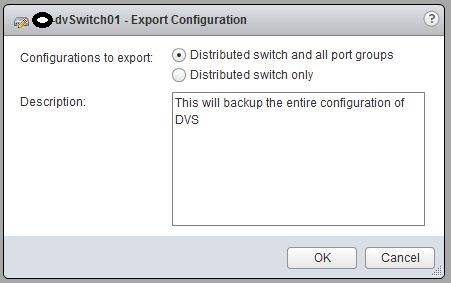
2- Click on Networking -> Right Click on your dvSwitch -> All vCenter Actions -> Export 
Configuration.


3- Choose to Save either the DVS settings only or DVS and Port Group Settings.


4- Click on Yes to confirm the export.


5- On the next Screen give this file a name and save it on a desired location on your computer.

--------------------------------------------------------------------------------------------------------------------------------------------------------------------------------------------------------------------------------------------------------------------------------------------------------------------------

Now, let's have a look at the process to IMPORT the settings:-

1- Login to the vSphere Web Client with a user with Admin / Network Privileges.


2- Click on Networking -> Right Click on your dvSwitch -> All vCenter Actions -> Restore
Configuration.


3- Select the backup file from which you wish to restore the settings of the dvSwitch.


4- Click on Next, confirm the settings and click on Finish.


--------------------------------------------------------------------------------------------------------------------------------------------------------------------------------------------------------------------------------------------------------------------------------------------------------------------------

Things to remember:-

While I was playing around with this backup, there are a few things which I learnt from my mistakes. Here are a few things you should know about this backup:-

a) This backup & restore does not re-creates the DVS, it helps you backup and restore configuration of a DVS.

b) You can use this backup to apply these settings across different DVS switches.

c) You need to create a DVS switch yourself and then apply these settings.

d) You can only Backup and Restore from a vSphere Web Client and not the C# client.

e) You can backup or restore the configuration of an onlder DVS as well such as 4.0, 4.1, 5.0 versions of DVS.

Enjoy the great features of DVS 5.1 and vSphere web client, this is an intelligent Virtual Switch which has loads to offer.


Share to spread the word & benefit others!!!