Showing posts with label Sunny Dua. Show all posts

Friday, July 20, 2018

My VMworld 2018 Plan.


As I type this I feel the guilt of not being able to blog for some time now. As most of you know, I have moved into the Product Management role for vRealize Operations, the role has sucked me into the wave of continuos enhancements which we are doing into the product.

A tremendous amount of time and effort went into closing vRealize Operations 6.6 and 6.6.1 and planning, implementing and releasing vRealize Operations 6.7. I am extremenly excited to see the success of vRealize Ops 6.7 and happy to share that we have not stopped but only doubled down our investments in making Operations simple and immenstly impactful to your IT environments, people, processes and ultimately business.

As always, VMworld would be the place where we will be able to share where we are headed and I thought it would be a good idea to share my VMworld Vegas schedule with you all. If you are preparing your VMworld agenda and looking at what sessions to attend, then here is a quick list of sessions I will be presenting during Breakouts and TAM sessions along with my immensely talented co-presenters :


SESSION INFO

Session ID: MGT2552BU
Submitted to: Both events
Session Type: Breakout Session
Session Title: Troubleshooting Made Easy
Speakers 
Chris McClanahan, VMware (Speaker, Submitter)
Sunny Dua, VMware (Speaker)

Session ID: MGT2621BU
Submitted to: Both events
Session Type: Breakout Session
Session Title: From VI Admin to Cloud Ninja: Top 5 Skills Needed in the Digital Age
Speakers 
John Dias, VMware (Speaker, Submitter)
Sunny Dua, VMware (Speaker)

Session ID: MGT2934BU
Submitted to: Both events
Session Type: Breakout Session
Session Title: Optimize Workload Cost and Performance Using the vRealize Suite
Speakers 
Helen Michaud, VMware (Speaker, Submitter)
Sunny Dua, VMware (Speaker)

Session ID: TAM3779U
Submitted to:
Session Type: TAM Customer Central Deep Dive
Session Title: vRealize Operations 7.0 - Foundation for Self Driving Operations
Speakers 
Kameswaran Subramanian, VMware (Speaker)
Sunny Dua, VMware (Speaker)

Session ID: TAM3841U
Submitted to:
Session Type: TAM Customer Central Deep Dive
Session Title: Intent-Based Workload Optimization with vRealize Operations
Speakers 
Chima Njaka, VMware (Speaker)
Sunny Dua, VMware (Speaker)


With this post, I also promise to come back to my regular cadence of blogging to ensure that I can always have an alternative career of a writer if the world decides to give up on IT :-)

See you at VMworld!!! 😁😁😁


Sunday, September 13, 2015

Part 1 - Virtualizing SAP - Why, When & How?

Last week I introduced this series about running SAP on VMware and this would be the first part of this series. As a technologist, I believe we should always look at both the sides of the coin while taking decisions and for me the first side is always business.

If you are not designing a technical solution keeping in mind the business benefits, then chances are that either your solution will miserably fail or it would never be adopted by the business since it does not keeps them into consideration.


WHY?

Working on the same principle, I thought I would start this series by talking about the Why and Whens before jumping into the Hows! Let us jump onto the reasons as to why we should virtualize SAP and how will it impact the Business Side and the Technology side of what we all know is one coin. 

I think it would be a marketing talk if I start talking about the features, stability and performance of vSphere as one of the driver for an organization to virtualize SAP. While these factors are a confidence builder, honestly speaking for a business it does not matter what platform they are running on, till the time the underlying infrastructure can serve the business demands without any compromise in the performance of business transactions which at the end of the are the backbone of any organization. Hence it is mostly for IT to decide on the platform while the business mostly looks at the reference case studies and the adoption rate by it's peers in the industry as a benchmark for choosing a platform.

Needless to say that vSphere has the most number of SAP workloads running on it if compared with any other hypervisor, because SAP itself runs there IT on VMware and I have not seen many, infact any customer NOT to follow the footsteps of there most critical software vendor. Now that we know that business will mostly follow references, it is important that we can get the right ones. It is easy to find references here on this link and I would encourage you to use them if required.

While the usual trend for business critical applications is to run on the most expensive hardware with no questions asked, we are seeing a rapid change in this trend in the last 5 years where customers are migrating from the expensive world of Unix platforms (Capex and Opex wise) to the commodity world of x86 platform. To top it all, Intel has done a fairly good job to ensure that there processors are becoming robust by the day to ensure higher standards of hardware availability. So while the biggest benefit to the business is saving tonnes of money, they also get the benefit of making a traditional application like SAP run on a platform which gives it the flexibility to Scale, Perform, Migrate, Upgrade, Update & Recover from disasters in a much more efficient manner than the traditional platforms.

At the end of the day SAP is just a simple 3 tier application, hence the 1st mantra is that the environment which you choose to run this application on should be simple.


WHEN?

While I can say NOW, it is only true for greenfield environments. For brownfield, the time to virtualize SAP has to the most critical decision for sure. While technology is no longer a limitation with the growing scale of physical x86 servers and VMware virtual machines, from a business point of view if you are planning to migrate from a Unix based environment, then you have to wait for certain opportunities which would make the move less painful or more rewarding. Let us quickly review all the opportunities: 

1- New SAP Deployment (Greenfield) - A scenario where you are building your first SAP module grounds up in a new SAP deployment. In this situation, virtualization has to be the first choice. Remember this includes all the tiers of your SAP application including the Oracle database which is licensed with the SAP license and hence you don't have to deal with Oracle licensing nightmares. One the other hand if you are worried about the WHY's then read above. 

2- SAP Upgrade Cycle - This is a no brainer, since this is your opportunity to explore the approved downtime from business around upgrading the SAP landscape. The SAP upgrade is where you could re-architect the SAP environment inclusive of Test, Development and Production to ensure that you can get the benefits of virtualization such as High Availability due to a distributed install.

3- Migration to 64 Bit Net-weaver - This is similar to a platform re-architecture and another great tipping point where the new 64 bit architecture can be built on the Virtual Platform of vSphere.

4- Expanding to New SAP Modules - This is similar to a new deployment, however if you have an existing SAP environment, you might NOT want to extend that for new modules, rather go for the virtual environment with the bells and whistles of VMware as this might be a lesson learnt for you to move your existing apps on top of the Virtual x86 Servers.

5- Hardware Refresh - I think this is the most obvious reason for you look at the x86 world as both the Capex and the Opex to run on the traditional hardware usually costs a bomb. 


Now that we have a good understanding of WHY and WHEN, it only makes sense to continue to the HOW part of the title!!


HOW?

Well, with this series, I will run your through a real life project which I recently completed for a customer in virtualizing their SAP Enterprise Resource Planning system, which essentially is the backbone of their organization. This includes, the TEST, Development and Production environments with the key VMware solutions for Virtualization, Operations & Disaster Recovery. Hence, the rest of the parts of these series would dive into each of the areas and numerous design decisions keeping in mind the requirements of the SAP application. While most the principles would be similar to architecting a vSphere environment for any application, with this series, I will call out the specific areas of consideration for SAP, right from sizing to implementation.

With that I will close this article and will see you with the next part of this series which would be:


Part 2 - Sizing SAP to run on VMware vSphere (coming soon...)


Till then.. Stay tuned!!

Share & Spread the Knowledge...


Wednesday, July 22, 2015

Want to learn about effective Performance & Capacity Management - See us at VMworld!

With VMworld 2015 San Francisco Edition being right around the corner, I thought it was only fair to share the details of the session which me and Iwan Rahabok, (author of VMware vRealize Operations Performance & Capacity Management  and indeed a great friend) are presenting during VMworld this year. So far we have decided to present only at San Francisco and Barcelona is still a topic in discussion for us. Here are the details of the session:


"If a VM has performance problem, and the Application Team thinks your Infrastructure is causing it, can you prove within 1 minute whether the ball is in your court or theirs? How can both party agree on a specific, measurable Performance SLA up front? This will reduce the blame-storming session. Can you prove that your Infrastructure is serving all the VMs well? How do you define "well"? How do you take into account Performance SLA when doing Capacity Planning? The session is based on the book by the speaker. More about the book can be found at http://virtual-red-dot.info/performance-and-capacity-management/"

Needless to say that these are the wise words of Iwan who has been working with some large clients around the world. I also wanted to add my scoop to this session by talking about how capacity plays an important role in performance management. 

In my opinion Performance and Capacity are the two sides of the same coin and one who learns to strike a balance between both would be efficient at Operations Management. The session goes above and beyond just the product and talks about some real life examples of efficient operations management by using the concepts of IT operations management framework.

Here are the session takeaways in brief:

1- Learn the art of performance management using vRealize Operations Manager

2- Real world examples of how vROps Performance & Capacity Management can help you manage your virtual infrastructure efficiently.

3- Learn the core concepts of Performance & Capacity counters which drive the health of your virtual infrastructure.


With this, I will close this article and would look forward to see you all in our session at VMworld!!

I would also be around in the vExpert Zone, VMware CTO Ambassador Booth and the VSAN booth where I would talk about how your can manage Performance & Capacity of VMware VSAN using vRealize Operations Management.

Till then..

Share & Spread the Knowledge!


Friday, July 3, 2015

Alvida India! Ni hao Singapore! - Change is the only thing constant.

If you are wondering that why you do not see any action on vXpress, then you can blame me and no one else. I think I should NOT give you the excuse of the BIG CHANGE which has happened in my life, rather our life (my family). I am happy to share that VMware has given me an opportunity to widen my horizons by moving into a new role and a new country. Yes, you heard it right!

I have moved to VMware Singapore and have taken up the role of a Senior Consultant with the ASEAN Professional Services at VMware. With a strong 30+ member team of Consultants, TAMs, Architects and Management, I would be responsible to deliver professional services portfolio for VMware customers in the entire ASEAN region. While, I am extremely excited and humbled by the opportunity provided by my employer, I am equally looking at contributing to the VMware community by sharing the experiences I would gain out of the large services engagements which I would be involved in. 


It is my third day in Singapore and I am already in love with the country. Needless to say that I miss my colleagues, relatives and friends in India, but as someone has said, "The only thing which is Constant in life, is CHANGE". 

I hope that explains why I was missing from the blogging seen... However, as I said before, this would not be an excuse but an opportunity for me to take a break, refresh my cache and blog away all my Virtual experiences as I have done in the past.

Would need all your support and best wishes for this change which I am enjoying so far......


Stay tuned for more on vXpress!!


Tuesday, November 11, 2014

Part 3: High Availability options with vRealize Operations Manager!

With this part of the series, I will start right from where I left in my last article. In the previous post, I spoke about the architecture of vROps along with the various services and node types which are available with this release. At the end of that article, I spoke about the benefit of having a cluster like architecture which not only provides scalability to the entire solution, but also allows you to protect the solution by building in resiliency.

The cluster architecture of vROps is not about scaling the various services within the solution, however it is about making these services modular by using a uniform measure to scale them. This uniform measure is a DATA NODE. Hence, instead of scaling out let's say just the PERSISTENCE layer by adding more memory, you would basically look at adding a new DATA NODE which will automatically add scale to all the services in an equal amount. This not only makes the solution modular, it also ensures that standardisation is maintained during scale resulting in a predictable and optimised performance.

For ease lets take a scenario where we have One Master Node, One Master Replica and one Data Node as shown in the figure below:-


Taking the above architecture let us discuss a few scenarios which are handled by the vROps cluster for data distribution, redundancy and resiliency.


HOW DATA ARRIVES INTO vROps CLUSTER

The resource will be assigned to one Node and all the analytics work regarding that resource will be done by that node itself. Only in case of failure the standby node which has the replicated data will become the Active Node for that resource.


HOW DATA IS RETRIEVED FROM vROps CLUSTER


With this architecture the data retrieval for 'HOT DATA' is extremely fast since the data is in the 
"in-memory database" layer of the cluster. Now that we know how the data is collected and retrieved, we can look at various failure scenarios which a vROps cluster can survive.

MASTER NODE FAILURE - If the master node fails, the complete responsibility of the master is taken over by the Master Replica. The Replica gets promoted and ensures that the solution is available at all the time. In case the Master Node failed due to a hardware failure and is back online with the help of vSphere HA, this node will be configured as the Replica Node thereafter.

DATA NODE FAILURE - If the Data Node fails, then the owning resources of that node are promoted on the surviving nodes which have a replica copy of these resources. The new owning node is responsible for collection of data from here onwards. If a data node has failed due to hardware failure and vSphere HA brings it back on a surviving ESXi node in the vSphere cluster, then this node automatically joins the vROps cluster and the data points are synced on this node. If a data node has been out of a cluster for a long time (more than 24 hours), it would be a better idea to re-create that node from the scratch rather than rebuilding/re-syncing the data.

IMPACT ON DATA FLOWS DURING FAILURE - If a node fails while the data is being queried or collected in the vROps cluster, it would not have any impact on data failure or availability as the surviving nodes will serve that data requirement through the replicated resources on them.

The placement of each node of the cluster should be done on a separate ESXi host using anti-affinity DRS rules to ensure that a host failure should not impact more than one Node in the cluster to avoid any data loss / availability issues.

Now that we know how vROps cluster architecture works, in the next part of this series we will have a look at the various deployment models which can come into picture when you plan to deploy vROps 6.0 in your infrastructure.


Till then.... Stay Tuned :-)


Share & Spread the Knowledge!!


Thursday, November 6, 2014

Part 1 : vCOps 5.x to vROps 6.0 - Intelligent Operations from Apps to Storage!

Back in the month of August, I had an opportunity to get an early interface to vRealize Operations Manager. I jumped out of the seat when I saw the new UI and the amazing features. As much I wanted to share the goodness of this version of vCOps now called vROps, I knew that I had to wait before we move the product from Beta to RTM and finally to a release built. I have been closely following the progress and have deployed a number of beta builds to provide constant feedback to the product management and of-course to learn the goodness which vROps brings along with itself.

Although their are quite a number of posts out there which have already given an overview of What's New with this version of vROps, I would probably want to give you a high level overview and then double click into the new architecture and features in the days to come. I am also planning a series on Installation & Configuration Best Practices and that would be inline with the series which I did with the 5.x versions.

Before we begin let's start with a quick graphic which gives a 30,000 feet overview of what's new with vRealize Operations Manager 6.0.


Let me dig down into each of these points and give you a preview of these enhancements:-


SCALABILITY - With vROps 6.0, the entire architecture of the application has changed. With this change, vROps is now enabled for horizontal scaling along with the existing option of vertical scale. This change makes the product bigger and better. You can now deploy vROps, in a cluster mode to scale the application on demand. This will allow you to add new objects which you want to monitor using vROps and needless to say that this will surpass the current limit of 12000 VMs which is the limitation of vCOps 5.x. This essentially is possible through the application RAID a.k.a. RAIN concept applied in the architecture. In short, the first node you will deploy will be a MASTER NODE, then you can create a REPLICA NODE which is to provide high availability to the vROps cluster. Every additional node which you add in this cluster will be a DATA NODE and allow you to scale the number of objects which you can monitor using the vROps cluster.


USER INTERFACE - This is definitely the best enhancement for me. vROps 6.0, just has a single UI which is not only intuitive, it has a great look and feel to it. This means that the 3 different UI's, i.e. Admin, vSphere & Custom all come together to make this Unified UI which will have all the features built in. The features on the UI will be unlocked based on the license you hold. The interesting thing is that it's not just an interface change, but a change in the way vROps will treat vSphere & Non-vSphere objects. All the objects within vROps 6.0 are so called first class citizens. In other words, all the objects and related metrics are treated equally whether they come from the VMware Adapter (vCenter Server) or from a 3rd party adapter.


ALERTS - With vROps 6.0, the alerting mechanism is not only based on hard & dynamic thresholds of the available metrics & super metrics, but you have the option to take it to the next level of creating alerts for multiple symptoms which you spot in your datacenter. In simpler terms, you have option to feed in the human intelligence into the alerting system to ensure that you not only get alerts on the things which you are not aware of, but alerts on things which you feel are important to your datacenter operations. While the symptoms make the alerts intelligent, their is an additional enhancement to make these alerts actionable through remediation engine built within vROps. This feature really brings the concept of Self-Healing Datacenter alive and ready to use with this release. vROps, 6.0 has actions built into the product based on python scripts. These actions can help you do sone of the basic tasks like, powering off/on VMs, Snapshots, adding resources etc. While this list is exhaustive, you also have the option to write your own actions. If this was not enough, VMware has integrated the Automation & Orchestration Jewel a.k.a. vRealize orchestrator (formerly called vCenter Orchestration (vCO)) via an adapter which can be used to trigger controlled workflows from vROps into the rest of the ecosystem of your datacenter.


VISUALIZATION - This is definitely one of the biggest enhancement based on the various requests from the customer and feedback from field employees like myself to the engineering groups. With vRealize Operations Manager, you can now look at creating custom reports without digging down into XML coding. With 5.x you only had a set of reports available, for anything extra it was a herculean task of going through XML coding and hoping that one would get the report they are looking for. While vCOps was not designed to be a reporting tool, the traditional IT still believes in looking at reports to take decisions. vROps 6.0 makes it easy by using the concept of VIEWS. You can built views either based on the dashboard widgets, or things such as Lists, Graphs, PIE etc. and plot the required performance or capacity data in these views. These views can then be planted either in reports or dashboards as per the requirement of the consumer. While all this is enhanced, the beauty is that this is available through simple GUI options instead of getting into behind the scenes. This takes custom dashboards and reporting to a completely new level and I am looking forward to create some useful dashboards and share them with you in the days to come. With this, I should also mention that vROps will no longer use 2 virtual machines ( Analytics & UI). Both the VMs are now clubbed into one and each vROps node will be a single VM with both the engines running in it.


CAPACITY MANAGEMENT - Capacity management with vROps from a policy perspective does not change much. Allocation & Demand are still in the game, however, since all the objects are FIRST CLASS citizens, the concept of capacity management is applicable to anything and everything now. While with vCOps 5.x, Capacity Management was limited to vSphere Objects, with vROps it is possible to apply the capacity management policies to each object which is being monitored by vROps. The other crucial change made with 6.0 is the PROJECTS feature. Projects is an enhancement to the What If Analysis. In essence, you will not only be able to forecast using the What If Analysis engine, you will also have the opportunity to convert your analysis into a Project and save it within the vROps engine. Doing this was not possible with the previous version. You will also have the additional option of using the commit option within the project which would automatically do the capacity modelling for you and reserve the capacity for the upcoming projects in an organisation. Remember, this is not limited to the virtual infrastructure. This functionality can be applied to anything which is being monitored under vROps. I can see this feature being tapped potentially by project management tools out their through the NEW API (I almost missed this) available with vROps.


AND MANY MORE....  :-)


Needless to say that this is just a teaser or an introductory post. In days to come, we will double click into each of these areas and many other features which I have not even highlighted yet. Hope you enjoy the post. As always, would love to hear your thoughts, feedback or constructive criticism :-)

STAY TUNED....


SHARE & SPREAD THE KNOWLEDGE :-)


Monday, October 6, 2014

Creating a One Click Datacenter Capacity & Cluster Performance Dashboard!

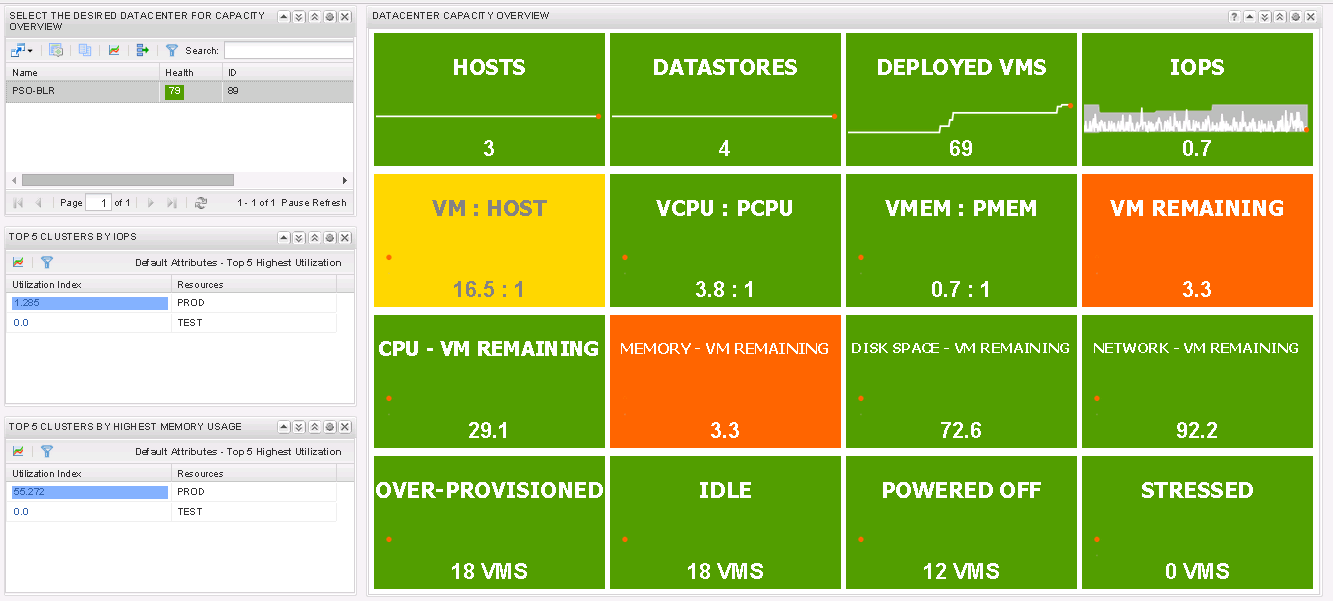
I have got a number of requests in the past to modify the famous Cluster Capacity Dashboard. Today I have modified it to create a similar dashboard which shows the capacity from a Datacenter Point of View. So if you have a large install base of vCenter Operations Manager with multiple Datacenters, you can use this dashboard to have a complete overview of the Datacenter. I call it the Executive Dashboard.

Here is how the dashboard looks like:-


This dashboard allows you to click on the datacenter for which you want to see the capacity overview. At the same time you can see the Top 5 Clusters across all the data-centers with highest amount of IOPS and Memory Usage. As always, I have made it very simple to replicate. You have to download the following files.

EXEC.XML - Click on the link to Download the file and import this to the following location within the UI VM.

/usr/lib/vmware-vcops/tomcat-enterprise/webapps/vcops-custom/WEB-INF/classes/resources/reskndmetrics

Do remember to have this file with the 644 rights to read, write and execute as shown in one of my article from the past. Here is the link:-


Once you have imported that file, you just need to import this another file as dashboard on the vCOps CUSTOM UI. I call it a the EXEC-DASHBOARD.XML (Click to download). In case you do not see the list of datacenters, Edit the Resources Widget on the Left Pane, Browse to Resource Kinds - > Datacenter -> Click on All Attributes once and click on OK. This will get you the list of the clusters and you will be good to go!! -

That's it.. This should do the trick for you. Please share you comments and feedback on how this vCOps dashboard has helped you with your work.


Share & Spread the Knowledge!!


Thursday, July 24, 2014

Part 12 - Deleting Unwanted or Stale Resources from vCenter Operations Manager!

In a number of projects I do, I have always noticed that customers have tried to add their test & development vCenter servers, remote site vCenter servers etc. to their production vCOps instance to see if vCOps is able to monitor all the instances across the sites. This could also happen if you by mistake register all the vCenter Servers in a Linked Mode Configuration on the admin page. Later on they realized that they want to use vCOps only for one of the sites and then got rid of the other vCenter Servers.


Now as good as it sounds, it does not really help the vCenter Operations Manager Database as this can result into a number of junk values in the databases which will not be cleared off unless you tweak certain advanced settings in the vCOps collector properties.


Let's have a look at two methods which can adopt to do this. One is manual and the other one in automated. I will show you both and leave it up-to you to chose what you think is right for your infrastructure.


Option 1 - Manually remove resources from Environment Tab

1- Login to vCOps Custom User Interface (Only available with Advanced and Enterprise Edition)

2- Click on Environment - > Environment Overview

3- Here you can see all the Resources which are registered with your instance of vCOps. For resources which you do not require or are stale, select them and click on the Delete Resource icon as shown below:-


Needless to say that this is painful if you have added multiple sources and you are not even sure what should stay and what should go away. If that's the case follow Option 2.

Option 2 - Editing Collector Properties for Deletion of Stale Objects

1- Login to vCOps AnalyticsVM via a ssh client such as putty.

2- Browse to the following directory 


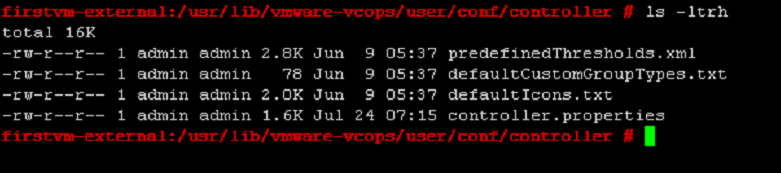
3- Edit the controller.properties file and look for the following values which define the retention period of stale or absent objects


deleteNotExisting = true - Simply means that you want to do a cleanup of resources which are non existing in the vCOps instance. This setting is set to FALSE and should be changed to true for you to cleanup all the junk you don't want.

deletionPeriod = 15 - If the policy is set to delete non existing resources, then they will be deleted post 15 days of there non-existence as per this setting. Change this to 1 Day if you want to cleanup junk resources within 24 hours.

deletionSchedulePeriod = 24 - This setting defines how often vCOps checks for Not Existing Resources.


Once you are done with editing the file, just sudo to the admin account and restart the vCOps Services as shown below


Guess what you are DONE :-)

I would highly recommend that if you are not proficient with Linux commands and editing files, then use Winscp to browse to these files, download them, edit them on a text editor and then upload them back in the system. Stay tuned for more vCOps fun coming your way soon... Till then!

*******************************UPDATE 29-July-2014*******************************

As per the comment from Jon Hemming, I am updating the article with the the information shared by Jon. As per the VMware KB 2020638 originally written by him, he has mentioned:

With vCOPs 5.7, deletionPeriod = 15 is renamed to deletionPeriodInHours = 360 and is, by default, commented. Ensure to uncomment this line.

Thanks Jon :-)

Share and Spread the Knowledge!


Saturday, July 5, 2014

VCDX – It’s a Journey and NOT a Destination!


It is 4th of July and the entire US is enjoying the holiday, while I am just travelling back post some exciting meetings with some of the large customers in India on how they should go about virtualizing their S-A-P infrastructure. The animated discussions on SAP HANA were not only satisfying, but were also fulfilling as I am getting deeper in my new role of a Solution Architect, here in India with VMware.

It all started in the year 2007, when I first heard about the term Virtualized servers which were using the storage I use to support in HP. “Really, you have shared the same LUN between 30 Windows and Linux virtual machine” is what I asked a customer with a wicked grin on my face, thinking that how people don’t understand the basics of storage – HUH!! Then is the first time, when the customer responded and said, “He is running the servers on VMware Hypervisor which allows him to do so”.

Alright, the world is changing and I was not as I was just 23 years old and was still contemplating, if I should get into the business of data-centers or should I become a Certified Public Accountant and work in Australia to live happily ever after. Well, the decision which I took is obvious and I am happy, that I was exposed to the world of Virtualization & VMware, at the right place and the right time. GOD HAD PLANS!! Isn’t it. ;-)

NOW, when I look back at the past 7 years, the only time, I have actually looked back is TODAY and trust me it was important. In the time gone by, life has been a roller coaster with all the ups and downs of the world. However, in the entire journey so far, not once I had to regret about the path which I chose back in 2007 as it was not only rewarding, but life changing for me.

In the year 2009, when I was deep into learning and working on VMware Virtualization Technology [BTW the learning will never stop – and this is the single biggest thing which keeps you going ;-)], I use to hear about the elite group of VIRTUAL GODS called VCDXs a.k.a. VMware Certified Design Experts. Being into VMware Support, we use to swear by these Virtual Gods while discussing the technology with colleagues and customers. The more I worked with customers, the more I realized that I need to be out there to learn how to design these infrastructures by understanding how they will help the business of the customers. This gave me a chance to look at a role of a consultant which helped me get on direct customer engagements.

Before I knew I was in front of the customers, helping them design small to large VMware Virtual Infrastructures. It's been close to 5 years now, and as I write this, in 4 days time, I will be out there in Singapore defending my VCDX design in front of the GODs of the game.

Well, it has been a dream run so far and a blog post would be small to thank all the people who have helped me in the journey so far. I am not very worried about the results to be honest, because the entire process of preparing for The Title has been rewarding. I have suddenly started talking like an Architect and every decision I take today has a list of benefits and trade offs along with a clear understanding of the impact on others :-) VCDX or NOT, I will continue to enjoy the joyride as I have done so far...

With that note I will close this article and go and relax a bit and look forward to enjoy the upcoming EXPERIENCE.

Will come back soon to start writing about what I have been up-to in my work (Other than VCDX). 

Till then.. Cheers :-)


Thursday, June 5, 2014

Part 11 - Creating Policies & Configuring Badges in vCenter Operations Manager!

It's been over a month since I wrote about vCOps. With this article I wanted to start sharing some of the content which I am creating as a video series around configuration of policies in vCenter Operations Manager. 

This article and the upcoming articles will all be a part of the Back to Basics series on vCenter Operations Manager which I started in March this year. 

Here are the links to the first Ten Parts :-


In this part I will discuss the Basic Function of policies and configuring badge thresholds. From here I will take you to capacity and time remaining calculations and then the rest of the configuration options in vCenter Operations Manager. Here is the video:-

Creating Policies & Configuring Badges in vCenter Operations Manage


Stay tuned for some more stuff video stuff on vCenter Operations Manager. Till then...


Share & Spread the Knowledge!!


Thursday, April 24, 2014

Part 1 - vCOps Extensions - Managing Operations Beyond Virtual Infrastructure

This is a season of Multi-Part Series on vXpress, especially around vCenter Operations Manager and Architecting vSphere. Sometimes this can mean that you need to wait for the next post in the series & I apologize for that. Since blogging is not a part of my Job, it becomes difficult sometimes to get all the content out at once. I write when I get to write which in the past few days has been difficult with lots happening in bother personal & professional life..

Anyways enough about me, lets talk about some COOL stuff which you can do with vCenter Operations Manager. With all my posts on vCOps, you must have noticed that all this while I was concentrating on using vCOps to manage the VMware Virtual Infrastructure. However with this exclusive series on vCOps Extensions, I would just focus and talk about the various plugins which are available to extend the vCenter Operations Manager Analytics engine to beyond your virtual infrastructure & to each nook and corner of your datacenter equipment. 


It is important to know that you need to be on Advanced/Enterprise edition of vCenter Operations Manager to use the capability of extending vCOps beyond the Virtual Infrastructure. 


Use Cases Beyond Virtual Infrastructure

Before I get into the the meat of this post, I wanted to share a use case which I was told about when I was first introduced to vCenter Operations Manager. In this case vCOps Custom Dashboard were used by a bank to fetch data from their EPBAX (Business Telephone Systems) into vCOps and then create custom dashboards for monitoring the call patterns which were coming into their call center. They could easily get call patterns and if their were abnormal call patterns in a particular queue, they would know it with the Anomalies feature of vCOps.

This would help to proactively know about the issues which their telephone lines, websites, internet banking systems etc might have or will have. This would also help them forecast the call patterns and workforce needs to handle them. I don't think their could be a better example of how creative you can get with vCenter operations manager.


Available Integrations

It is quite obvious that  their are a number of default integrations which are available today through adapters which can be easily installed and configured on your existing vCOps deployment and start bringing in the metrics from the third party resources such as storage arrays, networking equipment, applications etc. All such adapters are available on the VMware Solution Exchange Page for Cloud Operations Management.

As I write this post, there are 48 such management packs available which can be used for different purposes. There are more than 100 documents which can help you with the implementation of these management packs.


What's Next

With this series I will try and showcase some of the possible integrations which we can do with all I have in my PS Lab out here in India. I will post my experience with these integrations as and when I execute in the parts to come.

Soon coming out with the next part which is going to talk about monitoring the storage infrastructure with vCenter Operations Manager.

Stay tuned for more...


Share & Spread the Knowledge!!


Thursday, April 17, 2014

vCenter Operations Manager 5.x - FAQ Repository!

With the amount of work I have been doing on vCOps, I do get a number of questions on various platforms such as Twitter, Facebook, LinkedIn and on my posts around various things which people want to know. Although a great solution, it was not marketed the way it should have been and hence the awareness is missing. This is my attempt to make it easy for people to get some of the basic answers about the product on a single page. 

I will keep updating this PAGE as and when I get questions which I think will benefit the larger audience and will post it through the twitter and other social media channels. We will go in descending order to ensure you get the latest FAQs on the top of the list.

For getting updates regularly, I would recommend, you subscribe to vXpress and Follow me on Twitter..


vCenter Operations Manager 5.X - Frequently Asked Questions

*** Last Update Date - 17th April 2014 ***

FAQ 2 -  (Muditha Gayan Dissanayaka) - I just want to know one thing, how can I get a report of actual memory usage of VMs ? Because all the reports generated by the vCOP are depend on Active memory or some other thing...

RESPONSE - Great question... But what we need to understand is that Memory Usage is a thing of the past. vCOps uses the concept of derived metrics and not the primitive metrics such as usage. Usage is a virtual world can be incorrect data as we are taking about a shared infrastructure where, Memory & CPU are shared. Hence it will make sense to look at DEMAND rather than usage.. Demand is a derived metric which is a combination of Active memory + overheads.. That's the real utilization from the Guest OS perspective. Would recommend vCOps Analyze and Predict training which can help you drill down in the concepts...


FAQ 1 -  (Muditha Gayan Dissanayaka) - One thing I want to know, how can we tell to our customers to adjust allocated memory by analyzing DEMAND in order to maximize the memory utilization, because DEMAND is very small compare to allocated memory.As an example allocated memory to an Exchange Server is 16 GB, but DEMAND will be 3-4 GB !!!!, I just want to know a proper metric or an equation to suggest our customers like " 10 GB memory allocation is enough to this Exchange Server "


RESPONSE - I think your query is more related to the Over-sized VM Report which can sometimes be crazy to show to an application owner as it completely gives recommendations on the basis of Demand and not usage. 


There are 2 things which we need to keep in mind:- 

a) vCOps in its current Avatar, does not have the option to key in the bare minimum requirement for the OS or an application which is required to get support from an OS or Application vendor, hence you cannot just blindly rightsize the VM as per the recommendation in the report. You need to start with shaving off 15 to 20% to see the application behavior but yes, you cannot go below supported minimums. Eg. you cannot go on 512 MB of RAM on a Windows 2008 Server OS, since the minimum required and supported by MS is 2GB. I would so any rightsizing by taking the minimum required for support + demand + 20% buffer for Peaks and then come out with the final size. 

This might be an enhancement you might see in the future releases. 

b) Another thing to keep in mind is the policy which you have defined for the Oversize VM calculations. It is the most understood thing in the product and I will work on a blog post soon to explain it.. Just to let you know, I recommend a setting of 80% instead of the default 1% of the time. That will give you more real world results. 


Share & Spread the Knowledge!!